 PMO CONTROL · Project Management Office
Control schedules, costs and approvals in one place. Spot deviations early and keep every decision on record.
▶ PMO Control in action · from the well to production · real screens, demonstration project
Schedule, critical path and early warnings.
Budget, earned value and final cost forecast.
PIN-based authority and recorded decisions.
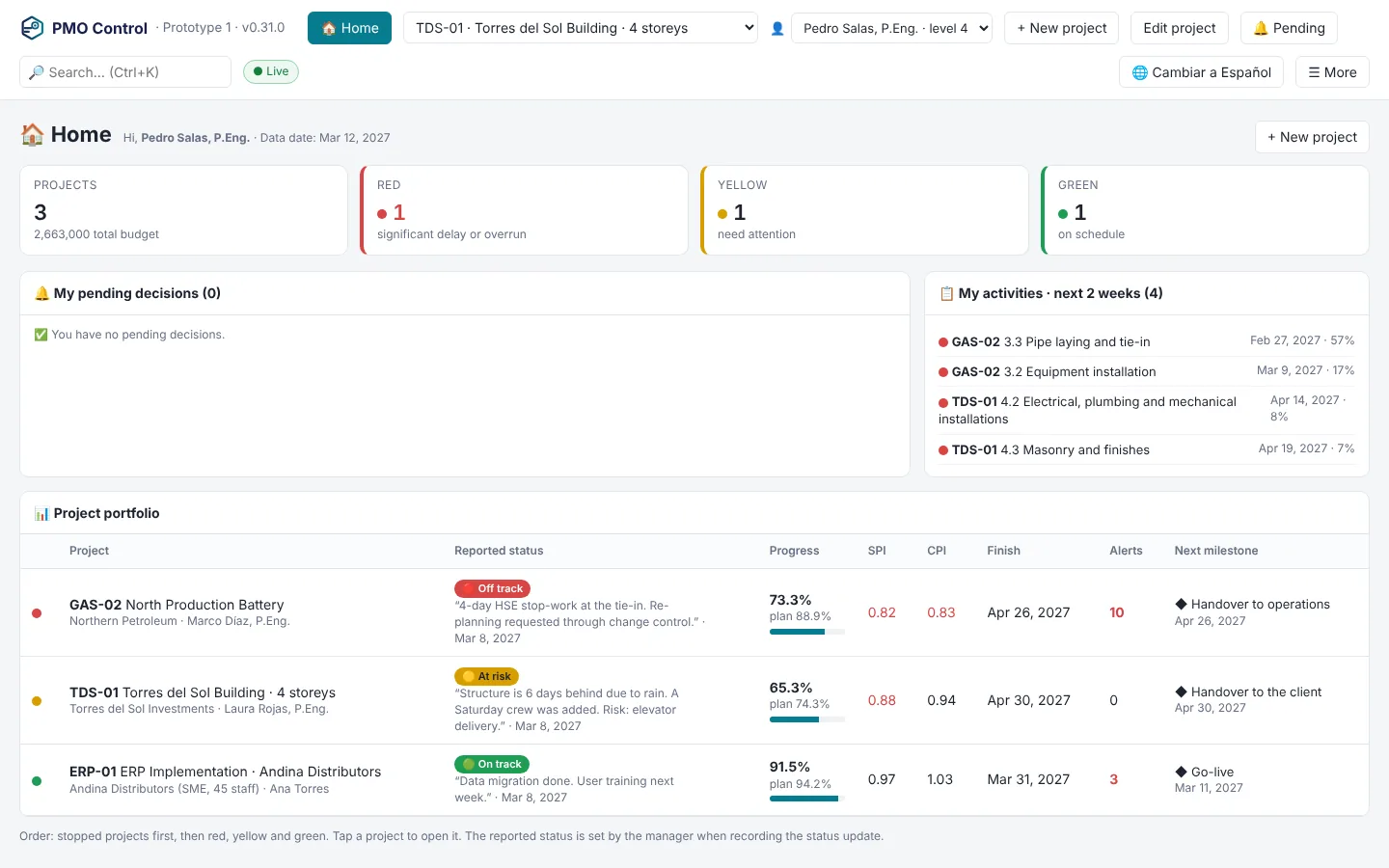
Real screen from the program: a company with three projects (building, oil & gas battery and an ERP rollout). Traffic light, actual vs. planned progress, SPI, CPI, the status each manager reports, and what each person has to do.
A compressor station, one pending H₂S detector and a stop-work order. PMO Control shows the impact in days, money and handover date, and formalizes it through change control.
Simulation with PMO Control v0.29: fictional project, company, authority and people, simulated dates. Real program screens.
The full presentation and a short video for each module, in English and Spanish.
A single warning engine checks every module at the status date. Nothing is left in a loose spreadsheet.
Tap a module to see what it solves, a real screen and its short video.
Say "take me to purchasing" and it takes you there; ask the project and it answers with its sources.
Excel, Google Sheets, CSV or MS Project, with a preview and warnings before saving.
PIN-signed charter, 5 authority levels and a matrix by amounts and days.
WBS, dependencies, work calendar, critical path and baseline.
The schedule logic as boxes and arrows, with the critical path in red.
People, crews and equipment with cost per hour, overallocation and leveling.
Several projects on one timeline, with links between them.
S-curve, SPI and CPI with traffic lights, milestones achieved or not.
Original, changes, committed, paid and forecast, phase by phase.
Simulated impact, Board vote with PIN and unauthorized-change alerts.
Risk register with a heat map and a suggested contingency reserve.
Industry templates, when to start each application, alerts before expiry and a red alert if work advances without a permit.
Each order linked to its activity: “issue now” and “will arrive late”.
Incidents with root cause and actions, ILO or OSHA rates, talks and inspections.
Hold points: without an approved inspection, the activity can't reach 100%.
Urgent items reach you right away by email, WhatsApp or text message. To-dos by level and a summary every morning.
Who, what, when and with what authority. Denied attempts are logged too.
Excel, CSV, TXT, XML for MS Project and the full project in Excel.
Automatic closing checklist, PIN-approved report and lessons learned.
Energy, industry and engineering: the same method at the well, in the plant or in the system. Schedule, cost, who decides and warnings in time. Each project can start from a template for its industry.
Wells, pipelines and stations: AFE by well or phase, regulator licences, HSE requirements (H₂S, hot work), stop-work orders with their cost and delay.
24/7 shutdowns planned by the hour, the cost of each hour of delay, work permits signed with a PIN and critical spares linked to the schedule.
Substations, lines, treatment plants and renewables: long-lead equipment procurement, authority by amount and earned value.
EPC projects and civil works: permits and licences, RFIs, submittals, quality hold points and handover.
Rolling out an ERP, launching a system or moving an office: iterations, user acceptance tests, go-live, the budget under control and who approves each change.
No project office and no specialists: the manager creates the project from the technology template, the team sees its tasks in Kanban, and management sees in the portfolio, with a two-line note, whether it is on track.
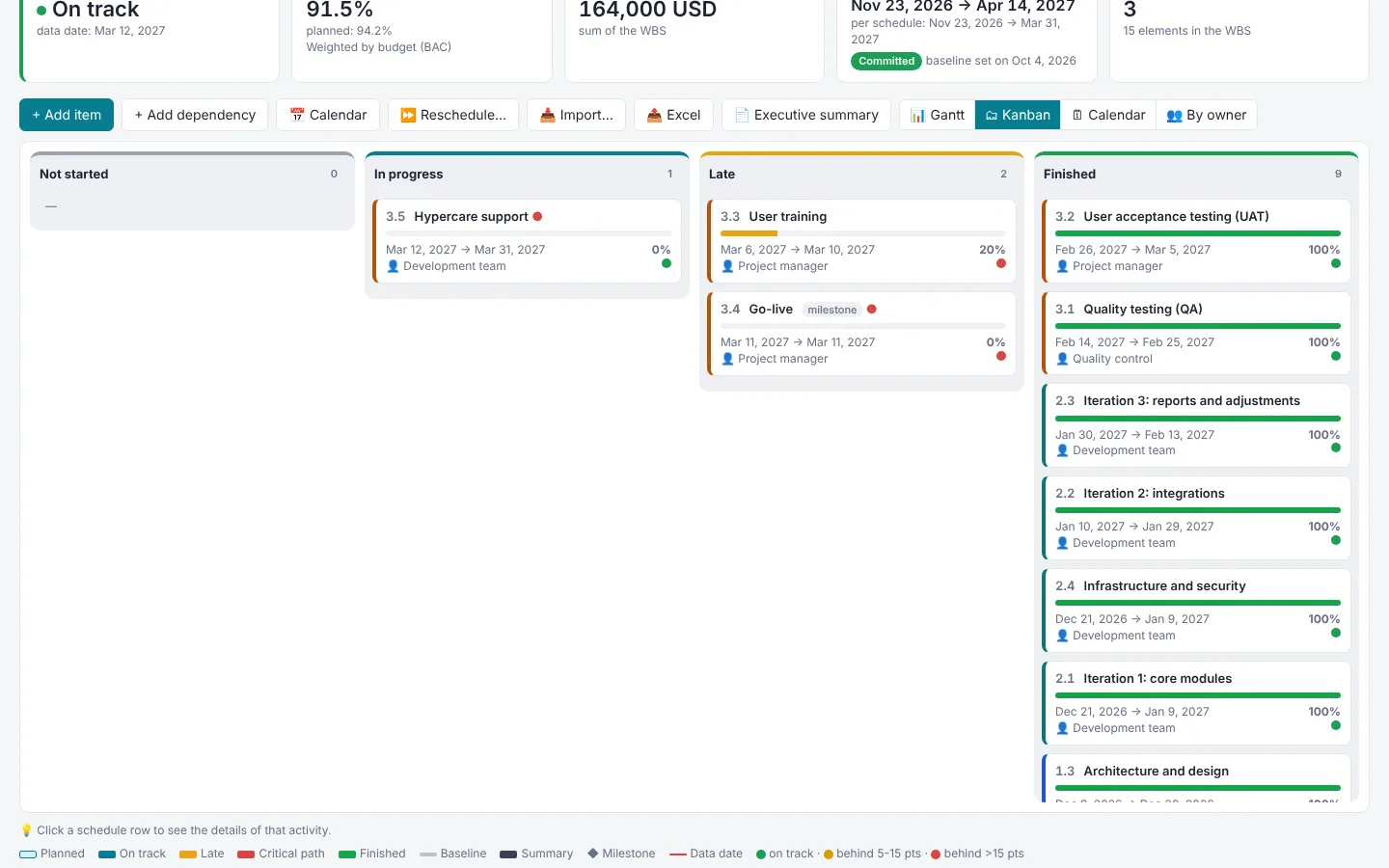
Real PMO Control screens, month by month, while the building rises with the real progress. One minute and 26 seconds.
Full test on a demo project with simulated dates and fictional people.
An illustration of the Torres del Sol life cycle: planning, execution, controls and handover. Fictional project and simulated dates.
PMO Control calculates the numbers; AI explains them, drafts for you and guides you. Always citing the source of each fact, and only if your company authorizes it.
"Why are we behind?" The answer arrives in seconds and cites where each fact comes from: the activity, the purchase order or the change.
The late-purchase deviation report and the weekly-meeting email, ready to review and send. It never makes up figures: it uses the program's own.
Ask how to do something or say "take me to the map", by typing or by voice. It answers from the user manual.
It ships turned off. The administrator turns it on with their signature, can exclude confidential projects and set a usage limit. It never sends PINs or passwords, and every use is logged.
Many tools record what happened. PMO Control decides who can do it before it happens.
PIN signatureApproving the charter, voting on a change or a large purchase requires the decision-maker's PIN.
Nobody approves their own workWhoever is responsible for an activity cannot approve its inspection.
Nobody votes for someone elseEach Board member votes in their own name, with their PIN.
Everything is on recordThe audit log keeps the old value, the new one and the authorization. Denied attempts too.
You tell us about your project and how you control it today.
Your Excel, Google Sheets or MS Project file comes into PMO Control in minutes, without redoing anything. One column with each activity name is enough.
With authority, earned value and warnings, in English or Spanish.
No. PMO Control works in the computer's browser and on the phone. Each person signs in with their PIN.
Yes: Excel, Google Sheets, CSV or MS Project (XML). No template needed: one column with each activity name is enough; dates, costs, owners and predecessors are recognized automatically if present. Before saving, a preview warns you about dates, dependencies or costs that don't add up.
Construction, engineering, oil & gas, energy, and also technology and SMEs: buildings, plants, civil works, installations, system rollouts. There are ready-made templates for construction, oil & gas and technology.
Yes. PMO Control is aligned with the good practices of PMI's PMBOK® Guide, current edition as of October 2026, and we update it with each new edition.
Each person signs in with their PIN and only sees their projects. Every action is logged. There are daily automatic backups and an encrypted off-site copy, in Canada.
Yes: a step-by-step manual, with a glossary and index, in English and Spanish. Open the manual →
It's a monthly subscription per company, based on the size of your operation. Book your demo and we'll send you a no-obligation proposal.
Artificial intelligence, support, web, networking, cybersecurity and cloud for businesses, entrepreneurs and homes. Calgary and remote.
Chatbots, process automation and AI tools that augment your team's productivity.
Computer maintenance and repair, software installation, and remote or on-site help.
Websites, online stores and custom apps, fast and mobile-friendly.
Design, cabling and setup of secure, high-performance networks.
Protection against viruses, ransomware and attacks. Audits, firewalls and training.
Cloud migration, business email, Microsoft 365 / Google Workspace and backups.
Reference prices for IT support plans.
Write to us and we'll reply within 24 hours with a no-obligation proposal.